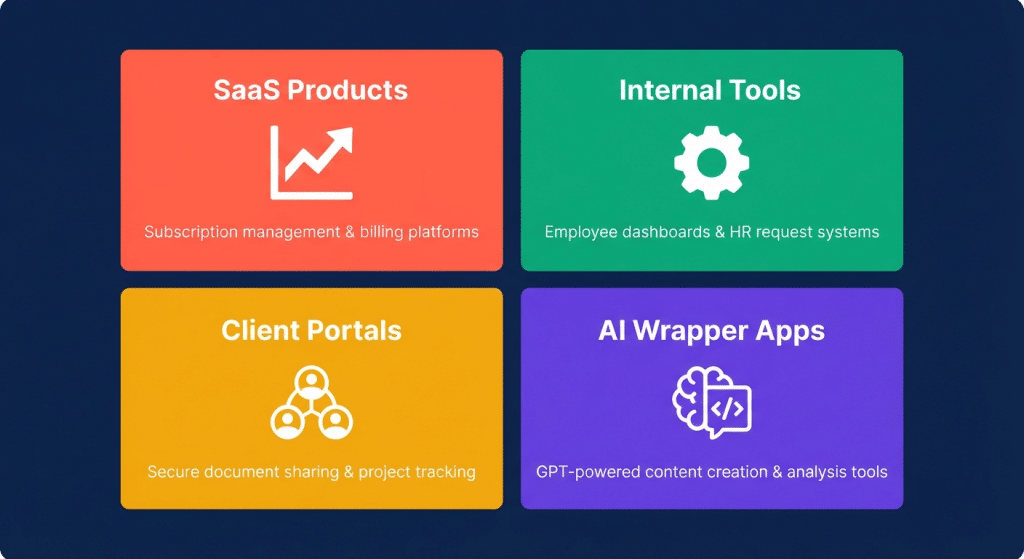
Lovable AI examples show that the platform can build far more than simple prototypes. Users have created SaaS micro-products, client portals, internal business tools, AI-powered apps, booking systems, e-commerce dashboards, and interactive learning platforms using natural language prompts instead of traditional coding. So, what can you actually build with Lovable AI? The answer depends on your workflow, but many real-world projects have already reached production. This guide explores 12 documented Lovable AI examples, explains why each app works well on the platform, provides a practical starter prompt, and highlights the limitations you should know before building your own application.
Key Takeaways
Lovable AI examples across SaaS, internal tools, and AI wrapper apps make up the largest share of documented community builds in 2026
SaaS micro-products are the top build type solo founders have shipped subscription tools using Lovable as the entire development layer
Internal tools are the most underreported success case operations teams replacing spreadsheets with custom dashboards used daily by real teams
AI wrapper apps are a growing category founders connecting GPT and Claude APIs through Lovable’s full-stack product layer
Production use is real but qualified: many Lovable AI apps run in production, but complex production maintenance typically requires developer involvement at some point
Agent Mode (2026 feature) enables autonomous AI development with independent codebase exploration and real-time web search
Example Category 1: SaaS Micro-Products
SaaS micro-products are the number one documented build type in the Lovable AI examples community. Solo founders and small teams have shipped real subscription-based tools using Lovable as the complete development layer frontend, backend, auth, and billing integration all generated through prompts.
What makes SaaS builds work in Lovable:
The React + Supabase stack handles multi-user apps with role-based access reliably
Stripe integration is achievable through prompts for standard subscription billing
The Supabase auth layer supports email/password, magic link, and Google OAuth without custom code
Real prompt starter:
“Build a SaaS keyword rank tracker for SEO freelancers. Users sign up, add websites, and add keywords per website. The app checks ranking position once daily (show placeholder data for now) and displays a position history chart per keyword. Dashboard shows all tracked websites with total keywords and average position. Two user roles: owner (full access) and client (read-only view of their website data). Supabase auth with email and password. Stripe billing integration for a $29/month Pro plan.”
As LOW/CODE Agency documented across 450+ Lovable builds including work for enterprise clients: the platform handles the product layer of a SaaS app reliably. Where manual developer work typically becomes necessary is in custom billing edge cases, complex webhook handling, and performance optimization at scale.
Example Category 2: Internal Operations Tools
Internal tools are the most underreported Lovable AI examples success case. Operations teams across marketing agencies, consulting firms, and e-commerce brands have replaced spreadsheets and manual workflows with custom dashboards that real employees use every day.
Why internal tools are where Lovable performs most reliably:
No public-facing scale requirements internal tools rarely need to handle thousands of concurrent users
The users are your own team security and edge cases are more controlled than with public apps
Imperfect UI is acceptable internal tools need to work, not look like a Figma portfolio
Build time pressure is low you can iterate over days, not hours
Real examples from the Lovable community:
A content agency built a client reporting dashboard where PMs log weekly deliverables and clients see a read-only summary
A freelance consultant built a project profitability tracker log hours, expenses, and invoices per project, see margin automatically calculated
A 10-person e-commerce team replaced their Google Sheets inventory tracking with a custom dashboard showing stock levels, reorder alerts, and supplier contact details
Real prompt starter (inventory tool):
“Build an internal inventory tracker for a 10-person e-commerce team. Team members can add products, log stock levels, set reorder thresholds, and add supplier contact info per product. Dashboard shows all products sorted by stock level with red highlighting for items below reorder threshold. One user role only all team members have full access. Supabase for storage. No external integrations needed for v1.”
Example Category 3: Client Portals
Client portals are a clean fit for Lovable AI examples because the core requirements two user roles, document sharing, project status, and comment threads map well to what the React + Supabase stack produces cleanly.
The core client portal build pattern:
Two roles: internal team (admin, full access) and client (read-only on most screens, comments allowed)
Project timeline with milestone status
File upload and sharing (Supabase Storage handles this)
Comment thread per project or milestone
Magic link login for clients (no password creation required)
What agencies have built:
Design agencies with 5 to 20 active clients have replaced scattered Google Drive links and Slack messages with dedicated client portals where clients see exactly what the team wants them to see
Consulting firms have used client portals to share deliverables, get sign-off on milestones, and maintain a written record of every client decision
Real prompt starter:
“Build a client portal for a design agency. Two roles: admin (us) and client. Admins can create projects, add milestones with status (not started, in progress, review, approved), upload files, and post comments. Clients log in via magic link, see only their projects, view milestone status, download files, and comment. Dashboard shows all clients and active projects. Supabase auth and storage for file uploads.”
Example Category 4: AI Wrapper Applications
AI wrapper apps are one of the fastest-growing categories in the Lovable AI examples community in 2026. These are products that wrap a core AI capability a GPT-4o or Claude call in a clean, productized interface that a specific user type can use without prompt engineering knowledge.
What Lovable provides for AI wrapper apps:
The complete frontend and UX layer around an AI API call
User authentication so the product has real accounts
Database storage for saving generated outputs and user history
Input forms that translate a non-technical user’s inputs into a structured API call
Output formatting that presents AI responses in the appropriate visual structure
Examples from the community:
A recruitment firm built a job description generator hiring managers fill in a form (role title, seniority level, must-haves, company culture) and the app sends a structured prompt to Claude and returns a formatted JD ready to post
A content agency built a social media caption tool upload a product image URL and brief, the app calls GPT-4o and returns 5 caption variations per platform
A coach built a personalized habit plan generator clients fill in a goal and constraint form, the app calls Claude and generates a structured 4-week plan
Real prompt starter (JD generator):
“Build an AI job description generator for hiring managers. Form collects: job title, seniority level (dropdown), team size, 5 must-have skills, 3 nice-to-haves, company culture description, and remote/hybrid/onsite status. On submit, send these fields as a structured prompt to the OpenAI API and return a formatted job description. Save each generated JD to the user’s history. Auth via email and password. Users can download generated JDs as text.”
Example Category 5: SaaS Dashboards and Analytics
Dashboards are among the most visually compelling Lovable AI examples because the combination of React charting libraries and Supabase real-time queries produces professional-looking analytics UIs from relatively simple prompts.
What dashboard builds typically include:
Charts for key metrics (line charts for trends, bar charts for comparisons, pie charts for distributions)
Date range filtering
Summary stat cards at the top
Data tables with search and sort
Export to CSV
Lovable handles charts through:
Recharts (built into the React ecosystem)
Chart.js
Simple custom components for stat cards and progress bars
Real prompt starter:
“Build a marketing analytics dashboard for a B2B SaaS company. Dashboard shows: total leads this month (stat card), conversion rate (stat card), leads by source (pie chart), lead volume over time (line chart last 90 days), and a leads table with columns for name, company, source, date, and status. Filter by date range. Data comes from a Supabase table. Allow manual data entry via an add-lead form. CSV export of the full leads table.”
What makes dashboards a good first Lovable AI examples project:
They have clear, visual output that makes it easy to evaluate whether the build is on track. They do not require complex business logic. And the visual result is impressive enough to share with stakeholders or use in a demo immediately.
Example Category 6: Booking and Scheduling Apps
Booking and scheduling apps are a popular Lovable AI examples category for service businesses, coaches, consultants, tutors, personal trainers, and small agencies who need appointment management without paying for a full scheduling platform.
Core booking app pattern:
Admin sets available time slots
Public booking page shows available slots
Visitor books a slot with their name and email
Confirmation email is sent (via Supabase Edge Functions or Resend integration)
Admin dashboard shows upcoming appointments with cancel and reschedule options
Real prompt starter:
“Build a booking app for a solo business coach. Admin logs in and sets available 1-hour slots for the week. Public booking page shows available slots for the next 14 days. Visitors pick a slot, enter their name, email, and a brief description of what they want to discuss. On booking, send a confirmation email to the visitor (use Resend). Admin dashboard shows upcoming bookings sorted by date with a button to cancel. Supabase for storage and auth.”
Where this type of Lovable AI examples app reaches Lovable’s ceiling:
Complex recurring availability rules, calendar sync with Google Calendar, and timezone handling for international clients require careful Lovable prompting and sometimes developer involvement for edge cases. A V1 with simple weekly slot management ships cleanly.
Example Category 7: E-Commerce Tools (Not Storefronts)
A clarification that saves many builders from frustration: Lovable AI examples in e-commerce are most successful when the target is a tool that supports an e-commerce business, not a full Shopify replacement.
What works well:
Product catalog management dashboards
Inventory and stock level trackers
Order management views connected to a Supabase database
Customer feedback and review collection portals
Discount code generators and trackers
Sales performance dashboards pulling from Supabase
What does not work well in Lovable:
Full payment processing storefronts with real product pages, shopping carts, checkout flows, and order fulfillment. The complexity of a real e-commerce storefront pushes beyond what Lovable handles cleanly. Shopify, WooCommerce, or a dedicated platform with developer support is a better fit for these Lovable AI examples use cases.
Real prompt starter (product catalog manager):
“Build a product catalog manager for a small e-commerce brand. Team members can add products with name, description, category, price, stock level, SKU, and up to 5 images (stored in Supabase Storage). Dashboard shows all products in a grid with thumbnail, name, and stock level. Filter by category and stock status. Edit and delete products. Export product list to CSV. Admin auth via email and password.”
Example Category 8: Portfolio and Showcase Sites
Portfolio sites are one of the simplest and fastest Lovable AI examples and one of the most visually striking outputs when the prompt is written with visual direction in mind.
As documented in Muzli’s 2026 Lovable for designers guide: since March 2026, Lovable includes built-in image generation with transparent background support. For portfolio builds, this means placeholder images, icons, and UI illustrations can be generated directly inside the builder without switching to a separate tool.
What portfolio sites built in Lovable AI examples typically include:
Hero section with name, role, and tagline
Projects grid with thumbnail, title, and short description
Project detail modal or page
About section
Contact form (connected to email via Resend or Supabase Edge Functions)
Optional: password-protected case studies for client work
Real prompt starter:
“Build a portfolio website for a product designer. Hero section with name, subtitle (‘Product Designer at Series A startups’), and a contact button. Projects grid showing 6 project cards with thumbnail, title, and 2-sentence description. Clicking a card opens a full project page with a long description, 4 full-width images, and the tools used. About section with photo placeholder and bio. Contact form that sends an email notification. Clean minimal design with lots of white space, Inter font, and black and cream color palette.”
Example Category 9: Educational and Learning Tools
Educational apps are a genuinely creative category within Lovable AI examples and one where the platform’s interactive storytelling and quiz mechanics work well out of the box.
What educational tool builds in Lovable AI examples look like in practice:
Quiz and flashcard apps with spaced repetition logic
Course progress trackers for coaching clients
Skill assessment tools that ask a series of questions and return a scored result
Interactive study guides where users mark topics as understood or need review
Habit and goal trackers for students with streak visualization
Real prompt starter (quiz tool):
“Build a quiz app for a language tutor. Tutor can log in as admin and create quiz sets with multiple-choice questions (question, 4 options, 1 correct answer). Students log in as learners, take a quiz, see their score at the end, and view which questions they got wrong with the correct answer shown. Tutor dashboard shows all quizzes with total attempts and average score. Supabase for storage and auth.”
Example Category 10: Freelancer and Agency Productivity Tools
Freelancers and small agencies have produced some of the most useful Lovable AI examples in the community because they build tools they personally need, which makes the requirements clear and the testing immediate.
Most common Lovable AI examples builds:
Time trackers with project and client tagging, automatic weekly totals, and invoice generation
Proposal generators that pull project details from a database and auto-format a client proposal
Contract and SOW trackers showing all active contracts, payment schedules, and outstanding invoices
Capacity planners showing team member availability and current project load
Real prompt starter (time tracker):
“Build a time tracker for a freelance designer. User can log time entries with client, project, task description, date, and hours. Dashboard shows total hours this week and this month by client. Export to CSV for invoicing. Simple auth with email and password. No integrations needed just Supabase storage.”
Example Category 11: Waitlist and Pre-Launch Tools
One of the fastest Lovable AI examples to build and one of the most practically useful for early-stage founders is a waitlist and pre-launch collection tool.
A Lovable AI examples waitlist app typically takes 15 to 20 minutes to build in Lovable and produces a clean landing page that captures email addresses, shows a confirmation, optionally tracks referrals, and gives the founder an admin dashboard to manage the list.
Real prompt starter:
“Build a waitlist landing page for a B2B SaaS tool. Public page has headline, 2-paragraph description, feature bullets, and an email signup form. On submission, store the email in Supabase and show a confirmation message. Optional referral code: after signing up, the user gets a personal referral link. If someone signs up via that link, both users move higher on the list. Admin dashboard shows all signups sorted by join date with referral count. No auth needed for public signup.”
Example Category 12: Interactive and Creative Apps
Lovable’s official creative coding examples page documents a category of Lovable AI examples that goes beyond business tools into interactive experiences, including music visualizers, storytelling apps, game mechanics, and generative art interfaces.
These are the most technically interesting Lovable AI examples in the community and the ones that most visibly demonstrate what React + TypeScript can produce from a plain-English prompt.
What Lovable’s own docs highlight:
Audio visualizers that respond to music input
Interactive storytelling with branching narrative and motion design
Generative pattern tools with parameter sliders
Simple browser games with score tracking and leaderboards
Real prompt starter (simple game):
“Build a simple word association game. A random word appears on screen. The user types the first word that comes to mind and hits enter. The app uses the OpenAI API to evaluate whether the association makes semantic sense (score 1-10) and stores each round. After 10 rounds, show a summary screen with total score, best association, and a share button. Leaderboard shows top 10 scores with username and date.”
Decision Framework: Which Example Type to Start With
Lovable AI examples span SaaS dashboards, internal operations tools, client portals, AI wrapper apps, booking systems, e-commerce management tools, portfolio sites, educational apps, and waitlist pages.
What is the best Lovable AI example for beginners?
A waitlist page or a simple internal tracker, such as a time tracker or inventory app. They are quick to build and ideal for learning.
Can you build a real SaaS product with Lovable AI?
Yes. Lovable AI supports SaaS apps with authentication, Supabase, and Stripe. More advanced features may require developer support.
Are there real Lovable AI dashboard examples?
Yes. Popular examples include marketing, project management, and inventory dashboards built with Recharts or Chart.js.
The Bottom Line on Lovable AI Examples
The breadth of Lovable AI examples across SaaS products, internal tools, client portals, AI wrappers, dashboards, booking systems, and creative apps answers the underlying question directly: the platform is not limited to toy demos or landing pages. Real teams are running real operations on apps built entirely in Lovable. Real founders have shipped subscription SaaS products to paying customers. Real agencies have replaced their client communication tools with Lovable-built portals.
The pattern across every successful Lovable AI example is consistent: clear scope at the start, a specific user in mind, data requirements defined before prompting, and a willingness to graduate to a code editor when complexity demands it. Start with any of the 12 categories above. Pick the one closest to a problem you actually have. The first real project teaches more about what Lovable can do than any amount of reading about it.
Curated byLorphic Digital intelligence. Clarity. Truth