

Freepik AI Templates combine ready-made design structures with Freepik’s growing AI editing and creation tools, giving creators a faster way to turn an existing layout into a customized visual. Instead of starting every design from a blank canvas, you can begin with a template, change its visual direction, edit elements, and use AI where it makes sense. Freepik’s current ecosystem includes templates, editable PSDs, AI-generated content, online editing, and AI-powered editing options. Its AI Assistant also includes guided templates for specific creative tasks, allowing users to follow a structured workflow instead of writing every instruction from scratch.
Key Takeaways
- Freepik AI Templates are useful when you want a finished design structure without building the entire layout yourself.
- Freepik provides templates across social media, presentations, posters, business designs, websites, infographics, and other creative categories.
- Many Freepik assets can be edited online or opened with AI-assisted editing options, depending on the asset and workflow.
- The AI Assistant includes guided templates that help users complete specific creative tasks without starting from a blank prompt.
- A template is most valuable when its structure already matches your goal, because you spend less time fixing layout problems later.
- You can combine templates with AI-generated images, references, colors, styles, and other creative assets for a more customized result.
- The best workflow is usually choose the structure first, customize the content second, then use AI for
- targeted improvements.
Looking for more AI-powered creative tools? Explore our guide to Freepik AI to see how it can simplify visual content creation and design workflows.
What Are Freepik AI Templates?
Freepik AI Templates can refer to two closely related workflows. The first is using Freepik’s large library of editable templates and then applying AI-assisted editing or other AI tools to customize the design. The second is using templates inside Freepik’s AI Assistant, where guided processes help users complete particular image-creation or editing tasks. Freepik describes its AI Assistant templates as guided processes designed to help users complete specific design tasks more efficiently without requiring a completely freeform prompt.
This distinction matters. A normal design template gives you a starting layout. An AI Assistant template gives you a guided creative workflow. Both can reduce the amount of work required to get from an idea to a usable visual.
What can Freepik templates contain?
Depending on the category, you may find:
- Social media layouts: Posts, stories, campaign graphics, promotional announcements, and branded content structures that already account for common social formats.
- Business designs: Presentations, flyers, corporate graphics, brochures, documents, and other assets where hierarchy and spacing matter.
- Marketing designs: Sale banners, advertisements, promotional graphics, product campaigns, and digital marketing layouts that can be customized around a specific offer.
- Editorial designs: Infographics, information graphics, posters, article visuals, and presentation-style layouts that help organize information visually.
- Editable PSD designs: Layered Photoshop-based templates where the structure can be modified instead of recreated from scratch.
Freepik’s template and PSD libraries currently expose options such as editable templates, typography, layouts, posters, banners, and other design formats, with many assets also showing AI-assisted editing options.
How Do Freepik AI Templates Work?
The simplest Freepik AI Templates workflow is:
Find a suitable structure → customize the design → add or replace visuals → refine with AI → export the finished asset.
That sounds simple, but the order matters.
Many beginners make the mistake of choosing a visually attractive template without considering whether its structure fits the actual content. They then spend more time fighting the layout than they would have spent choosing a better starting point. A better approach is to choose the template based on the communication goal first.
Step-by-step workflow
1. Define the design objective.
Decide whether you are creating an Instagram post, presentation, flyer, advertisement, infographic, website graphic, or another asset. This immediately narrows the type of template you need.
2. Search by the actual design problem.
Instead of searching only for “beautiful template,” search for something concrete such as “Instagram sale post,” “business presentation,” “technology infographic,” or “product promotion.”
3. Evaluate the layout before the colors.
A template with the correct hierarchy is usually more useful than one with attractive colors but the wrong text structure.
4. Replace the content.
Change the headline, supporting copy, imagery, icons, branding, and other elements to match your project.
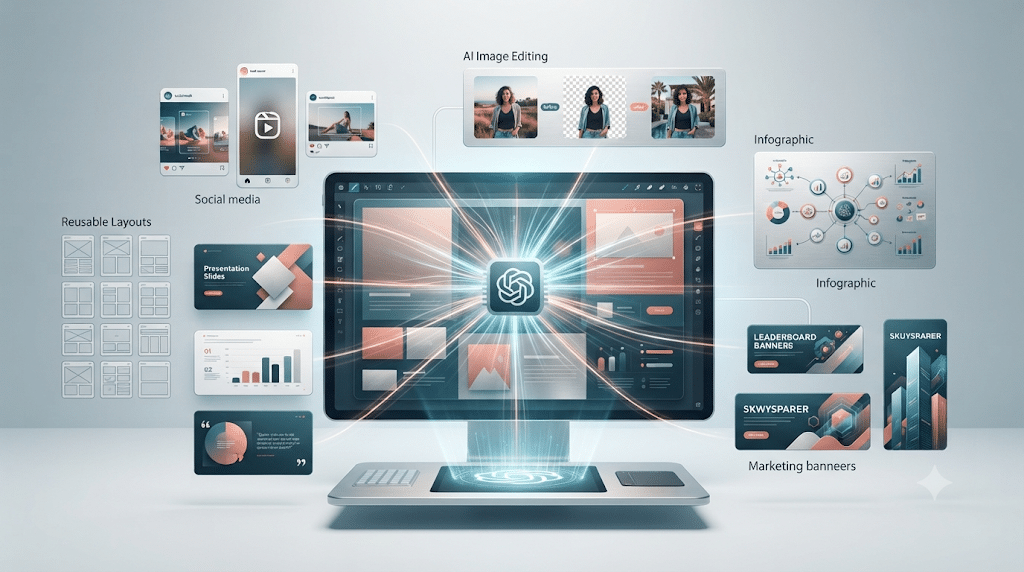
5. Use AI selectively.
If an image needs changing, use AI editing. If the background is wrong, modify it. If you need a new visual, generate one separately rather than forcing every part of the design through AI.
6. Review the final communication.
Make sure the headline is readable, the hierarchy is obvious, and the design still communicates the original message after customization.
Why Use Freepik AI Templates Instead of Designing From Scratch?
The biggest advantage of Freepik AI Templates is not that they eliminate design work. They reduce the amount of repetitive structural work that comes before the creative decisions. A blank canvas requires you to decide the canvas size, spacing, hierarchy, alignment, typography, image placement, and visual balance. A good template has already solved much of that initial problem.
Templates are especially useful when:
- You need a professional starting point: A structured layout can help avoid the common problem of randomly placing text and images until the design feels acceptable.
- You have limited design experience: Templates provide visual examples of how headlines, images, supporting information, and calls to action can work together.
- You produce content regularly: A reusable template system can make recurring social posts, promotions, announcements, and business content much faster to produce.
- You need multiple variations: Starting from one strong structure makes it easier to create several versions without rebuilding the layout every time.
- You need to communicate information clearly: Infographics, presentations, and business documents benefit from established visual hierarchy.
The goal is not to make every design look identical. The goal is to spend your time on the message and creative direction instead of repeatedly rebuilding basic structure.
How Do You Find the Right Freepik Template?
Finding the right Freepik AI Templates starts with the content format and purpose rather than visual style. Freepik’s template ecosystem covers different asset types, and its search pages include categories such as templates, PSDs, vectors, presentations, infographics, social-media assets, and other design resources.
Use this search formula
Purpose + format + audience + visual direction
For example:
skincare Instagram post minimalist
or:
technology business presentation modern
or:
ecommerce sale banner clean
What should you check before choosing?
| Check | What to look for |
|---|---|
| Layout | Does the structure fit your content? |
| Text space | Is there enough room for your actual headline? |
| Image area | Can your product or visual fit naturally? |
| Hierarchy | Is the main message immediately obvious? |
| Format | Does it match Instagram, presentation, web, print, or another destination? |
| Editability | Can you change the elements you actually need to change? |
| Brand fit | Can the colors, fonts, imagery, and style be adapted? |
A template can look impressive in the preview and still be a poor choice if it does not leave enough room for your real content.
How Can You Customize Freepik AI Templates?
Customization is where Freepik AI Templates become more useful than simply downloading a finished design. Start with the structural elements that need to remain. Then change the parts that make the design yours.
Change the message first
Your headline should communicate the actual purpose of the asset. Do not keep placeholder copy simply because it fits the template.
For example, replace:
“Discover Something New”
with a message that tells your audience what the design is actually about.
Replace the imagery
If the template contains a generic photograph, replace it with a product image, brand visual, illustration, or AI-generated image that fits the campaign. Freepik’s current asset pages show templates and PSDs with options such as “Edit with AI” and “Edit online,” depending on the individual asset.
Adjust the visual identity
Change:
- Brand colors
- Typography
- Image treatment
- Decorative elements
- Background
- Icons
- Product placement
The objective is to make the final design feel intentional rather than like a template with a logo placed on top.
How Does the Freepik AI Assistant Work With Templates?
The Freepik AI Assistant provides a different approach to Freepik AI Templates because the template can function as a guided creative workflow rather than simply a static design file.
Freepik describes these templates as structured processes for completing specific tasks. Users select a template, provide the requested inputs, review the result, and refine it. Examples in Freepik’s documentation include workflows such as generating a scene from a character, adjusting camera angles, and creating product close-ups.
The AI Assistant template workflow
Open AI Assistant → Select Templates → Choose a task → Provide inputs → Review → Refine
This is useful for people who know the outcome they want but do not necessarily know how to construct the perfect prompt.
Instead of asking:
“What prompt should I write?”
you can start with:
“Which guided workflow matches what I’m trying to create?”
That can make AI creation less intimidating for beginners.
What Is the Difference Between Freepik Templates and AI Assistant Templates?
This is an important distinction.
| Type | Main purpose | Best for |
| Traditional Freepik template | Provides a design structure | Posts, presentations, flyers, banners |
| Editable PSD template | Provides layered editable design | Advanced customization |
| Edit with AI asset | Lets AI assist with modifications | Visual changes and refinements |
| AI Assistant template | Provides a guided AI workflow | Specific image-generation or editing tasks |
Traditional Freepik AI Templates are therefore not necessarily “AI-generated templates.” Some are conventional editable design assets that can be combined with AI tools. Others are guided AI workflows. Understanding the difference prevents unrealistic expectations.
Can Freepik AI Templates Be Used for Social Media?
Yes. Social media is one of the strongest practical use cases for Freepik AI Templates because creators repeatedly need similar formats but different messages.
A creator might need:
- Product announcement
- New collection post
- Sale announcement
- Educational carousel
- Quote graphic
- Story promotion
- Event announcement
- Giveaway design
- Brand update
The advantage of using a template is that the overall structure can remain consistent while the content changes.

Build a repeatable social workflow
Choose one visual system → customize the first design → save the style direction → reuse the structure → change content for each campaign.
This gives your feed more visual consistency without forcing every post to look identical. Freepik’s template search currently includes social-oriented assets such as Instagram sets, Instagram packs, posts, and campaign designs.
Can You Use Freepik AI Templates for Presentations?
Yes. Presentation templates are useful when the challenge is organizing information rather than simply making one attractive image.
A presentation needs:
- Clear hierarchy
- Consistent typography
- Repeatable layouts
- Visual variety
- Readable information
- Logical progression
Starting with a template gives you a visual system that can be adapted across multiple slides.
For example, you might use one layout for an introduction, another for statistics, another for a comparison, and another for a conclusion while keeping the same overall visual language.
That is much more effective than designing every slide independently.
How Can You Combine Freepik AI Templates With AI-Generated Images?
This is where the workflow becomes more powerful. You do not have to choose between templates and AI image generation. Use them for different jobs.
Template = structure
AI image generator = custom visual
AI editing = refinement
For example, imagine you are creating a skincare promotion.
- Choose a product-promotion template.
- Replace the placeholder image with your product.
- Generate a complementary background if needed.
- Adjust the visual composition.
- Edit the background or supporting elements with AI.
- Replace the text with your campaign message.
- Check the final design at the intended publishing size.
Freepik’s AI Suite currently separates creation tools such as the AI Image Generator from editing tools such as Reimagine, Background Remover, Retouch, Expand, and Upscaler. That makes a hybrid workflow more practical than expecting one AI feature to perform every step.
How Can You Use AI Templates for a Brand Without Looking Generic?
This is where many template-based designs fail. The problem is not using a template. The problem is using the template without building a visual system around it.
Keep these elements consistent
- Color palette: Choose a small group of brand colors and use them consistently instead of changing the palette for every post.
- Typography: Use a repeatable heading and body-text structure so viewers can recognize your content quickly.
- Image treatment: Keep photography, illustration, or AI-generated visuals within a similar visual direction.
- Spacing: Preserve a consistent amount of breathing room around important content.
- Voice: Make the copy sound like your brand rather than the placeholder language in the template.
The template should become the framework, not the identity.
How Should Beginners Use Freepik AI Templates?
Beginners should resist the temptation to edit every element immediately.
First understand the template.
Look at the hierarchy.
Ask:
What does the viewer notice first?
Then:
What do they understand second?
Then:
What action should they take?
Once you understand the visual sequence, replace the content while preserving the useful structure.
Beginner workflow
Step 1: Choose a simple template with clear hierarchy.
Step 2: Replace the headline with your actual message.
Step 3: Replace the main visual.
Step 4: Apply your brand colors.
Step 5: Adjust supporting text.
Step 6: Remove unnecessary decorative elements.
Step 7: Check readability on the final platform.
This produces a cleaner result than trying to redesign the entire template from the beginning.
How Should Professionals Use Freepik AI Templates?
Professionals should think in systems rather than individual files. Instead of finding a new template for every post, build a small collection of structures that correspond to recurring content needs.
| Content need | Template system |
| Product announcement | Product-focused layout |
| Educational content | Information hierarchy layout |
| Promotional campaign | Offer-focused layout |
| Brand story | Editorial layout |
| Testimonial | Quote-focused layout |
| Data | Infographic layout |
| Presentation | Consistent slide system |
Then use AI to customize the imagery and variations. This approach can dramatically reduce repetitive production work while keeping creative control.
What Are the Biggest Freepik AI Template Mistakes?
Choosing appearance over structure
A template may look beautiful but fail to accommodate your actual copy. Choose the structure first and the aesthetic second.
Keeping placeholder content
Template text exists to demonstrate the layout. It should not automatically become your final message.
Over-editing
If you change every font, color, spacing rule, image, and layout element, you may lose the reason you selected the template in the first place.

Adding too much AI
AI is useful when it solves a specific problem. Do not use AI simply because it is available.
Ignoring licensing
Before using an asset commercially, check the license associated with your Freepik plan and the specific content. Freepik’s current plan documentation distinguishes access, AI tools, content, and licensing across plans.
Freepik AI Templates Decision Framework
Use this framework before starting a design.
| Your situation | Best starting point |
| You need a complete layout | Freepik template |
| You need advanced layer editing | Editable PSD |
| You need a visual from scratch | AI Image Generator |
| You already have an image to change | AI editing |
| You need a guided creative process | AI Assistant template |
| You need several campaign variations | Template + AI workflow |
| You need consistent brand content | Reusable template system |
This keeps your workflow focused. The best tool is the one that solves the current bottleneck.
Are Freepik AI Templates Better Than Starting With a Blank Canvas?
For many everyday designs, yes. A blank canvas gives you complete freedom, but complete freedom also means every design decision starts with you. A template gives you constraints. Those constraints can actually improve speed because they remove unnecessary decisions. The important question is whether the template’s structure matches the project. If it does, customize it. If it does not, choose another structure. Do not spend an hour forcing the wrong template to work.
Are Freepik AI Templates Worth Using in 2026?
Freepik AI Templates are particularly useful for creators who need to produce visual content regularly but do not want to rebuild every design from zero. Freepik combines a large template and asset ecosystem with AI creation and editing tools, while its AI Assistant adds guided workflows for specific tasks. The biggest benefit is not simply speed. It is workflow flexibility.
For experienced creators, the better approach is to build reusable template systems around recurring content needs. Either way, the goal should remain the same:
Use the template to reduce repetitive design work while keeping the final creative decisions under your control.
For a complete platform overview covering every Freepik AI tool beyond product photography video generation, audio tools, and the full model lineup see the complete guide on Freepik AI: Complete Guide to AI Image, Video, Models, and Creative Tools in 2026
FAQs About Freepik AI Templates
What are Freepik AI Templates?
Freepik AI Templates are template-based or AI-guided design workflows that help users create and customize visual content faster. Freepik’s AI Assistant also provides guided templates for specific creative tasks.
Can I edit Freepik templates with AI?
Many Freepik assets currently provide options such as Edit with AI, although availability depends on the individual asset and workflow.
Are Freepik AI Templates free?
Freepik offers free access to some content and tools, while premium templates and AI capabilities depend on the user’s plan. Current plan details can change, so check Freepik’s official documentation before relying on a specific feature or allowance.
Can I use Freepik AI Templates for Instagram?
Yes. Freepik provides social-media-oriented templates, including Instagram sets, posts, and campaign designs that can be customized for different content needs.
Final Verdict
Freepik AI Templates make the most sense when you treat them as a starting framework rather than a finished design that only needs a few words changed. Choose the right structure first. Then customize the message, imagery, colors, typography, and branding.
Freepik’s current AI ecosystem supports both traditional template-based design and AI-assisted creation, while its AI Assistant provides structured templates for specific visual tasks.The most effective workflow is therefore:
Choose → Customize → Generate → Edit → Refine → Publish.
Curated by Lorphic
Digital intelligence. Clarity. Truth


