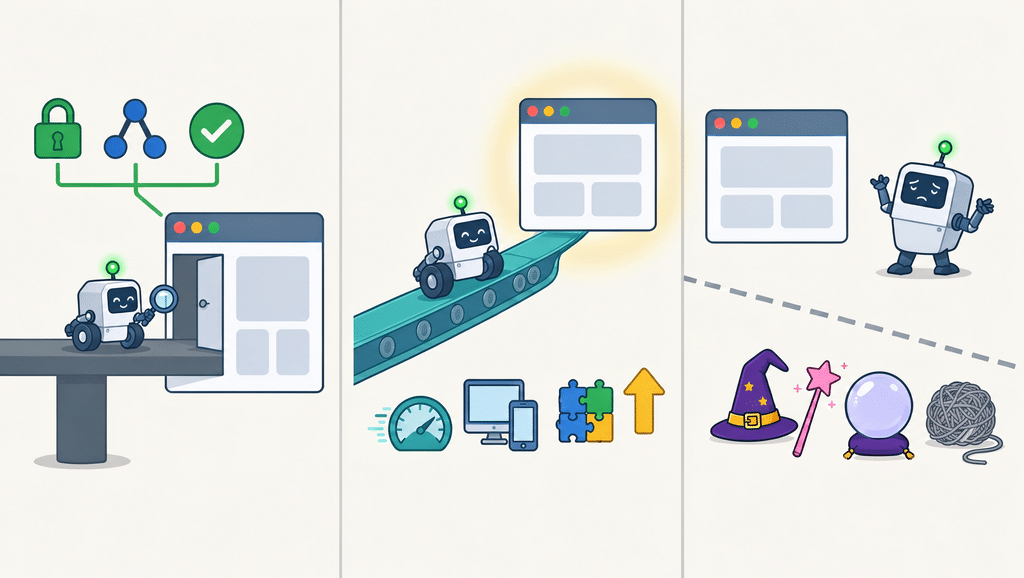
Technical SEO best practices fall into 3 groups: requirements, recommendations, and folklore. Google’s documented requirements are short: Googlebot is not blocked, the page returns an HTTP 200 status, and the page has indexable content. Everything else is a recommendation that helps, plus a long tail of “must-dos” with no documented effect.
This guide sorts the technical SEO best practices into those 3 groups, gives you a 30 minute audit that uses Google’s own free tools, and ranks fixes by what to do first. The examples come from Connecticut service business sites, but nothing here is location specific.
Key Takeaways
Technical SEO best practices start with Google’s 3 documented requirements: Googlebot is not blocked, the page returns HTTP 200, and the page has indexable content.
Core Web Vitals are a recommendation. Google highly recommends good scores and says they align with what its ranking systems reward, but they do not replace relevant content.
Google says AI Overviews and AI Mode need no special markup or AI text files, so skip “AI technical SEO” add-ons.
Fix in this order: the 3 requirements, then Core Web Vitals, then internal links and structured data.
On WordPress, a site left set to discourage search engines can keep a new site out of Google after launch.
Lorphic’s website SEO audit checks the 3 requirements first, and fixes are billed at $15/hr.
Which Technical SEO Best Practices Does Google Actually Require?
Only 3. Google’s technical requirements page says a page is eligible for indexing when Googlebot is not blocked, the page works and returns HTTP 200, and the page has indexable content. The same page says getting into search results costs nothing, so anyone selling indexing as a paid secret is overselling.
Requirement
What breaks it
How to check
Googlebot is not blocked
robots.txt rules, login walls, CDN or firewall rules, noindex tags
Search Console Page Indexing and Crawl Stats reports, URL Inspection
Page returns HTTP 200
404 pages and server errors
URL Inspection shows the status code
Page has indexable content
Text in unsupported file types, spam policy violations
URL Inspection and the live page text
On WordPress, check 2 launch settings first: the search engine visibility box under Settings, Reading, and any staging copy that stayed public. Both are quick to test and both are easy to miss.
Which Technical SEO Best Practices Are Recommendations, and Which Are Folklore?
Sort every item on a technical checklist into 3 labels before you pay to fix it: Required, Recommended, or No documented effect. The table below does that for items that appear on most technical SEO best practices lists. Evidence means a statement in Google’s own documentation, checked on November 4, 2026.
Practice
Label
Evidence
Googlebot is not blocked
Required
Google’s technical requirements
Page returns HTTP 200
Required
Google’s technical requirements
Indexable content
Required
Google’s technical requirements
Good Core Web Vitals
Recommended
Google highly recommends them in its Core Web Vitals page
Crawlable internal links
Recommended
Listed in Google’s AI features SEO checklist
Important content in text form
Recommended
Same checklist
Structured data matching visible text
Recommended
Same checklist
Business Profile details up to date
Recommended
Same checklist
Special AI schema, AI text files, or markup
No documented requirement
Google says none is needed for AI Overviews or AI Mode
A perfect 100 lab score
No documented target
Google’s targets are good Core Web Vitals, not a lab score
Hiding pages with robots.txt
Wrong tool
Google points to noindex and snippet controls to limit what shows
Notice what is missing from the Required rows: speed scores, schema, and AI files. Those can help, but none of them decides whether a page is eligible to be indexed.
Technical SEO Best Practices 1 to 3: The Requirements
1. Make sure Googlebot can reach the page
Google only indexes pages that are public and do not block Googlebot. Pages blocked by robots.txt are unlikely to appear in results, and a login wall stops crawling entirely. Google’s AI features guide adds that crawling should also be allowed by any CDN or hosting layer.
Open yourdomain.com/robots.txt and look for Disallow: / under a rule that applies to Googlebot or all bots.
Run 3 money pages through URL Inspection and read the crawl and index status.
Compare the Page Indexing report with your list of important pages.
2. Serve a 200 status on every page you want indexed
Google only indexes pages served with an HTTP 200 status, and error pages are not indexed. A service page that returns 404 after a redesign is simply gone from Search. Check the status with URL Inspection, then restore the page or redirect it to its closest match.
3. Put your content in indexable form
Indexable content means text in a file type Google supports that does not violate its spam policies. Google’s AI features guide also lists making important content available in textual form as a best practice. Put your services, service area, and phone number in real text, not only inside images.
Technical SEO Best Practices 4 to 9: The Recommendations
These 6 are not gates, but Google names them in its own guidance, so they are the safest places to spend time after the requirements pass.
4. Pass Core Web Vitals on real visits
Google’s Core Web Vitals page highly recommends good scores and says they align with what its core ranking systems seek to reward. The targets are LCP of 2.5 seconds or less, INP of 200 milliseconds or less, and CLS under 0.1, measured on real user visits rather than one lab run. They support good content but do not replace it.
LCP: resize and compress the hero image, and avoid loading it lazily above the fold.
INP: remove or delay heavy third-party scripts such as chat widgets.
CLS: set width and height on images and embeds so the layout does not jump.
Every important page is linked from at least 1 other page with a descriptive anchor
A site crawler orphan page report
6
Mobile content parity
The same main content and links appear on mobile and desktop
URL Inspection rendered page
7
Structured data matches visible text
LocalBusiness or Organization data repeats details visible on the page
Google’s Rich Results Test
8
Consistent business details
Name, address, phone, and hours match the site and Google Business Profile
Business Profile and site footer
9
Monthly monitoring
Page Indexing, Crawl Stats, and Core Web Vitals are reviewed monthly
Search Console
How Do You Run a 30 Minute Technical SEO Audit With Free Tools?
You can test every requirement and most recommendations among these technical SEO best practices with free tools. Give yourself 30 minutes and work in this order.
Step 1 (5 minutes): Open the Search Console Page Indexing report. Note which pages are not indexed and the reason listed for each.
Step 2 (5 minutes): Open the Crawl Stats report under Settings. Look for spikes in errors or slow server responses.
Step 3 (5 minutes): Run URL Inspection on your 3 highest value pages. Confirm each is indexed, returns 200, and shows your services in the rendered text.
Step 4 (5 minutes): Open robots.txt, and on WordPress check the search engine visibility setting under Settings, Reading.
Step 5 (5 minutes): Run PageSpeed Insights on the same 3 pages and read the mobile tab. Record LCP, INP, and CLS.
Step 6 (5 minutes): Use a free crawler to confirm each money page has at least 1 internal link pointing to it.
Which Technical SEO Mistakes Waste the Most Time?
These 5 mistakes appear on many technical SEO best practices checklists, and each one sends effort in the wrong direction.
Mistake
Why it fails
Do this instead
Using robots.txt to hide pages
Google points to noindex and snippet controls to limit what shows in Search
Use noindex on pages you want out of results
Adding AI-specific markup or text files
Google says none is needed for AI Overviews or AI Mode
Spend the hours on the 3 requirements
Chasing a perfect lab score
Google’s targets are good Core Web Vitals on real visits
Fix the metric that fails on your slowest template
Tuning speed while pages are not indexed
A fast page Google cannot index earns no search traffic
Pass the 3 requirements first
Auditing once and never again
Plugin, theme, and redirect changes can break a working site
Review Search Console monthly
Decision Framework: Which Technical SEO Best Practices Should You Fix First?
Symptom
Likely cause
First fix
Skip for now
A new page is not in Google
Blocked, noindex, non-200 status, or no internal link
URL Inspection, then fix the reported cause
Speed tuning
A page is indexed but does not rank
Relevance or competition more than technical issues
Improve how well the content matches the query
More technical tweaks
The site is slow on phones
Heavy images or scripts
Fix the Core Web Vital that fails
Rewriting all content
Local service pages are missing from results
Orphan pages or thin duplicates
Add internal links and merge duplicates
Pages for more towns
A vendor sells “AI technical SEO”
A markup or file add-on
Ask which Google documentation requires it
Paying for it
How Does Lorphic Apply Technical SEO Best Practices for Connecticut Businesses?
Lorphic, a digital marketing agency in Guilford, CT, checks the 3 requirements before anything else, because speed and schema work cannot help a page Google cannot index. Its website SEO audit reports which requirements pass, which Core Web Vitals fail, and which fixes come first.
Fixes are scoped on the $15/hr full-service model, so a small business pays for the hours a fix takes. For local visibility on top of the technical base, see the local SEO guide.
6 Frequently Asked Questions About Technical SEO Best Practices
What are technical SEO best practices? T
echnical SEO best practices are the site-level steps that let Google crawl, index, and fairly evaluate your pages. They start with 3 requirements: Googlebot is not blocked, pages return HTTP 200, and pages have indexable content. Recommendations such as good Core Web Vitals and crawlable internal links come next.
What does Google require for a page to be indexed?
Google’s technical requirements say Googlebot must not be blocked, the page must return an HTTP 200 status, and the page must have indexable content. Meeting them makes a page eligible, but Google says indexing is not guaranteed.
Do Core Web Vitals affect rankings?
Google highly recommends good Core Web Vitals and says they align with what its core ranking systems seek to reward. They are one part of page experience and do not replace relevant, helpful content. The targets are LCP of 2.5 seconds or less, INP of 200 milliseconds or less, and CLS under 0.1.
Do I need special technical SEO for AI search?
No. Google’s documentation says there are no additional requirements to appear in AI Overviews or AI Mode, and no special markup or AI text files are needed. A page must be indexed and eligible to show with a snippet.
How often should I run a technical SEO audit?
Check Search Console monthly for indexing errors and Core Web Vitals changes. Run a deeper audit after a redesign, a platform change, or a large batch of redirects. The is SEO worth it guide helps decide how much ongoing work a small site needs.
Which technical SEO best practices should a small business fix first?
Among technical SEO best practices, fix the 3 requirements first, then Core Web Vitals on your slowest money pages, then internal links and structured data. Ignore add-ons that Google’s documentation does not list.
Technical SEO best practices reward order: make pages reachable, working, and readable, then make them fast and well linked.
Curated by Lorphic Digital intelligence. Clarity. Truth.