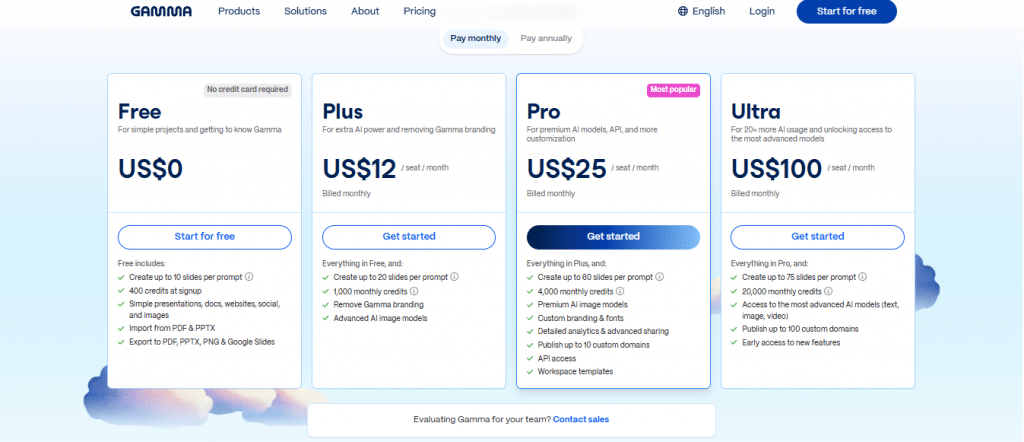
Gamma AI pricing in 2026 follows a three-tier model Free, Plus at $12 per month, and Pro at $25 per month with an Enterprise option for larger organizations. The free plan gives you 400 AI credits to start, which is enough to generate around 8 to 10 full presentations before you need to upgrade or earn more credits. Each plan unlocks progressively more features, higher credit volumes, and better sharing options. Understanding Gamma AI pricing before you pay matters because the difference between the free and paid plans is not just credits it is about professional presentation sharing, custom branding, and whether the “Made with Gamma” badge appears on client-facing decks.
Key Takeaways
Gamma AI pricing starts at $0 free plan includes 400 AI credits with no credit card required
Plus plan costs $12 per month and removes the “Made with Gamma” badge essential for client-facing work
Pro plan costs $25 per month and unlocks unlimited AI usage, custom themes, and priority support
Generating one full presentation costs approximately 40 credits free accounts get roughly 8 to 12 decks before needing more
Manual text editing in Gamma costs zero credits only AI-powered actions consume credits
You can earn free Gamma AI credits through referrals without paying anything
If you’re still learning about the platform, our What Is Gamma AI? guide explains how Gamma works, its AI capabilities, and who it’s designed for.
What Is Gamma AI Pricing and How Does the Credit System Work?
Gamma AI pricing is built around two things: your subscription tier and your credit balance. Every AI-powered action you take inside Gamma generating a presentation, using the AI assistant to rewrite a card, or adding an AI-generated image costs credits. Your subscription tier determines how many credits you get each month and what features you can access.
Credits are Gamma’s internal currency. They do not roll over between billing periods on most plans. When you run out of credits mid-month, you either wait for the next billing cycle, earn more through referrals, or upgrade your plan. Understanding how credit consumption scales alongside structured Gamma AI pricing tiers helps small businesses and marketing professionals choose the right subscription without unexpected budget surprises.
Here is the important part most reviews miss: manual editing in Gamma costs zero credits. If you generate a presentation and then manually rewrite every card yourself, your credit balance stays exactly where it was after generation. Credits only disappear when you ask the AI to do the work for you. This means a careful user can stretch 400 free credits much further than someone who uses the AI assistant for every small edit.
Gamma AI pricing rewards users who generate first and edit manually. The credit system is not a barrier it is a reason to write your own refinements rather than AI-editing every card.
Gamma AI Free Plan: What Do You Actually Get?
The Gamma AI free plan is genuinely useful not a crippled demo designed to force an upgrade. Here is exactly what free accounts receive:
What the free plan includes:
400 AI credits at signup no credit card required
Access to all three output types: presentations, documents, webpages
Full editing capabilities including manual text edits, card reordering, and layout changes
Pre-built theme library with dozens of design options
Web publishing share your presentation via a public link
Basic analytics showing view counts on shared decks
What the free plan does not include:
Custom themes or brand colors saved as templates
Removal of the “Made with Gamma” badge on shared presentations
Password-protected sharing
Priority support
Unlimited AI usage
The “Made with Gamma” badge is the most significant practical limitation of the free plan for business users. It appears at the bottom of every shared deck and signals to clients or investors that the presentation was made with a free tool. For internal team use, this is irrelevant. For client-facing presentations, it matters enough that most professionals upgrade to Plus after their first few client decks.
How many presentations can you make on the free plan?
Action
Credit Cost
Free Credits Available
Presentations Possible
Generate full presentation
~40 credits
400
~10 presentations
AI edit one card
2 to 5 credits
400
~80 to 200 individual edits
AI image generation
10 credits
400
~40 images
Manual text editing
0 credits
Unlimited
Unlimited
Ten full presentations from a free account is a legitimate amount of output. For freelancers building their first few client decks, students creating project presentations, or small business owners testing whether Gamma fits their workflow, the free plan provides enough to make a real decision.
Gamma AI Plus Plan: $12 Per Month Is It Worth It?
The Plus plan at $12 per month is the most popular Gamma AI pricing tier for small businesses and individual Evaluating Gamma AI pricing is essential when deciding whether to upgrade your presentation workflow. The Plus plan at around $ per month (or starting at $9 per month with annual billing) is the most popular Gamma AI pricing tier for small businesses and individual professionals. The price is low enough that the decision is usually made the first time someone sends a client a presentation and sees the “Made with Gamma” badge.
What Plus Adds Over Free:
Removes the “Made with Gamma” badge from all shared presentations
Increased monthly credit allowance (1,000 credits) for consistent regular use
Password-protected sharing for confidential presentations
Custom font uploads for closer brand alignment
Priority email support
Who Should Choose Plus:
Freelancers and consultants creating client-facing presentations regularly
Small business owners sharing decks with customers or partners
Marketing teams producing multiple presentation types per month
Anyone who finds themselves hitting the free credit limit regularly
Reviewing Gamma AI pricing shows that Plus costs less than most SaaS tools that do far less. For any business using Gamma more than once or twice per month for external presentations, the badge removal alone justifies the upgrade. The professional presentation a client receives without a “Made with Gamma” badge is indistinguishable from one built in a much more expensive design tool.
Gamma AI Pro Plan: $25 Per Month When Does It Make Sense?
The Pro plan at $25 per month doubles the Plus price and delivers a specific set of capabilities that matter primarily to power users and teams creating high volumes of presentations.
What Pro adds over Plus:
Unlimited AI usage for text generation and editing no credit anxiety
Custom themes saved to your account every future deck inherits your brand automatically
Advanced analytics including engagement data per slide
Custom domain for published presentations
Collaboration features for team editing
Priority support with faster response times
Who should choose Pro:
Agencies creating branded presentations for multiple clients
Marketing teams running Gamma as a core content production tool
Professionals creating 10 or more presentations per month
Anyone whose brand consistency across presentations is non-negotiable
The custom theme feature is what makes Pro genuinely different from Plus. On Plus, you can upload fonts but you are still selecting from Gamma’s theme library for each deck. On Pro, you save your brand colors, fonts, and layout preferences as a locked custom theme. Every new presentation inherits your brand automatically. For agencies managing multiple client brands, this saves hours of manual styling per project.
Gamma AI Pricing Compared: Free vs Plus vs Pro
Feature
Free
Plus ($12/mo)
Pro ($25/mo)
AI credits per month
400 starter
Higher monthly allowance
Unlimited AI usage
“Made with Gamma” badge
Yes shown
Removed
Removed
Custom themes
No
Partial (fonts only)
Full custom themes
Password-protected sharing
No
Yes
Yes
Custom domain
No
No
Yes
Analytics
Basic (view count)
Standard
Advanced (per-slide)
Team collaboration
No
No
Yes
Priority support
No
Email priority
Fastest response
Price
$0
$12/month
$25/month
The jump from Free to Plus is the most commercially significant Gamma AI pricing upgrade for most users. The jump from Plus to Pro matters primarily for agencies, power users, and teams.
How Much Does Gamma AI Cost Per Presentation?
This is the question most Gamma AI pricing comparisons skip. The per-presentation cost changes significantly depending on which plan you are on, how you manage your credit allowances, and how heavily you rely on the advanced AI features. Understanding the financial breakdown helps small business owners and digital marketing professionals optimize their production budgets.
On the free plan: 400 credits divided by 40 credits per presentation equals approximately 10 presentations. Cost per presentation: $0, for up to 10 decks.
On Plus ($12/month): With a higher monthly credit allowance, most Plus users generate 15 to 25 presentations per month before approaching limits. Cost per presentation: approximately $0.40 to $0.67.
On Pro ($25/month): Generative tier usage means managing credit allotments efficiently across regular tasks. Cost per presentation: scales reasonably based on high-volume professional output.
For a freelancer creating 5 client presentations per month on Plus, the per-deck cost is $2. A graphic designer charging $500 for a presentation project absorbs that cost invisibly. For a small business owner creating monthly sales decks internally, the Plus plan at $12/month replaces a far more expensive design tool subscription, optimizing overall digital marketing workflows and streamlining daily productivity tasks.
How to Get Gamma AI for Free (and Get More Free Credits)
Gamma AI pricing includes several ways to extend your free credit balance without paying.
1 Referral credits Gamma awards bonus credits for each friend you refer who signs up and uses the platform. This is the most reliable way to extend free usage. A single referral that converts can restore a meaningful portion of your credit balance.
2 Complete the onboarding checklist New Gamma accounts can earn additional starter credits by completing the onboarding checklist connecting integrations, generating your first presentation, publishing your first deck. These steps are worth completing immediately after signup.
3 Use manual editing strategically Manual text edits cost zero credits. If you generate a presentation and then edit every card yourself, your credit balance only dropped the 40 credits for generation. Being intentional about when you use AI edits versus manual edits can double your effective output from the same credit balance.
4 Downgrade after a high-use month If you upgraded to Plus or Pro for a one-time heavy production period, you can downgrade back to free after the billing cycle. Credits earned during a paid period do not carry over, but your account history and presentations remain accessible.
For the most current Gamma AI pricing details, visit gamma.app/pricing directly pricing and credit allocations update periodically.
Gamma AI Pricing vs Competitors: Is It Competitive?
Gamma AI pricing is competitive with the main alternatives against the main alternatives in the AI presentation space.
Tool
Free Plan
Paid Plan
Key Difference
Gamma AI
400 credits
$11 to $25/month
Best balance of AI quality and price
Beautiful.ai
No free plan
$12/month
Stronger templates, less AI generation
Tome
Limited free
$16/month
More document-focused, less slide-focused
Plus AI
No free plan
$12/month
Works inside Google Slides different model
Canva AI
Yes
$15/month
Broader design scope, less presentation-specific AI
Gamma’s $12 Plus plan is the most accessible professional AI presentation tool available in 2026. Its free plan is more generous than most competitors. The only area where Gamma’s pricing model creates friction is the credit system itself some users find credit management distracting compared to an unlimited flat-rate model, which is why Pro’s unlimited AI usage is appealing for heavy users.
For businesses connecting Gamma to broader content production workflows, our guide on AI content ecosystems explains how AI presentation tools fit into a structured content strategy that builds visibility across multiple channels simultaneously.
Decision Framework: Which Gamma AI Pricing Plan Should You Choose?
Choose Free if you are testing Gamma for the first time, creating internal presentations where the badge does not matter, or producing fewer than 10 presentations before you have a sense of whether the tool fits your workflow. Use the 400 starter credits deliberately generate first, edit manually after.
Choose Plus if you create client-facing presentations where the badge would undermine professionalism, you use Gamma more than twice a month, or you want password-protected sharing for confidential decks. At $12 per month, it is the clearest upgrade decision in Gamma’s pricing structure.
Choose Pro if you run an agency creating branded presentations for multiple clients, you generate more than 20 presentations per month, or brand consistency across every deck is a non-negotiable business requirement. The custom theme feature and unlimited AI usage together justify the $25 price point for power users.
Choose Enterprise if your organization needs SSO, advanced security controls, centralized billing, and dedicated account management. Contact Gamma’s sales team directly for Enterprise Gamma AI pricing it is custom based on seat count and requirements.
FAQ: Gamma AI Pricing
How much does Gamma AI cost per month?
Gamma AI pricing offers a free plan with 400 starter credits, a Plus plan at $12 per month, and a Pro plan at $25 per month. Enterprise pricing is available on request. All paid plans are billed monthly or annually, with annual billing offering a discount.
Is Gamma AI free to use?
Yes. Gamma’s free plan includes 400 AI credits with no credit card required. The free plan gives access to all three output types presentations, documents, and webpages and allows web publishing. The main limitations are the credit volume and the “Made with Gamma” badge on shared decks.
How many credits does Gamma AI give for free?
Free accounts receive 400 AI credits at signup. Generating one full presentation costs approximately 40 credits, giving free users around 8 to 10 complete presentations. Manual text editing costs zero credits and does not consume your credit balance.
What is the difference between Gamma AI Plus and Pro?
Plus at $12 per month removes the “Made with Gamma” badge, adds password-protected sharing, and increases your monthly credit allowance. Pro at $25 per month adds unlimited AI usage, full custom theme creation, advanced per-slide analytics, custom domain publishing, and team collaboration features.
Is Gamma AI pricing worth it for small businesses?
Yes for most small businesses using presentations regularly. The Plus plan at $12 per month removes the professional badge limitation and provides enough credits for consistent use. At less than the cost of a single stock photo subscription, Gamma AI pricing delivers presentation generation, AI editing, and web publishing in one tool.
The Bottom Line on Gamma AI pricing
Gamma AI pricing is straightforward once you understand the credit system and what each tier actually delivers. The free plan is a genuine starting point, not a demo. The Plus plan at $12 removes the most significant limitation for professional use. The Pro plan at $25 removes every friction point for teams and agencies, streamlining extensive collaborative workflows.
Gamma AI pricing is fair for what it delivers; at $12 to $25 per month for professional AI presentation generation, it is among the most cost-effective tools in its category. The main question is which specific subscription plan matches your actual daily usage and business goals.
Start free and generate your first few presentations. The moment the watermark badge matters or the credits run out faster than expected, Plus pays for itself on the very first client deck you present.
Curated byLorphic Digital intelligence. Clarity. Truth.